
*Monster Hunter Wilds* captivates with its stunning visuals, but achieving optimal performance while preserving those breathtaking graphics can be a challenge. Here are the best graphics settings to enhance your experience in *Monster Hunter Wilds*.
Monster Hunter Wilds System Requirements
If you're aiming for higher resolutions or max settings, you'll need a high-end GPU with ample VRAM and a powerful CPU. Check out where you can order *Monster Hunter Wilds* for your desired platform.
| Minimum Requirements | Recommended Requirements |
| OS: Windows 10 or newer CPU: Intel Core i5-10600 / AMD Ryzen 5 3600 Memory: 16GB RAM GPU: NVIDIA GTX 1660 Super / AMD Radeon RX 5600 XT (6GB VRAM) DirectX: Version 12 Storage: 140GB SSD required Performance Expectation: 30 FPS @ 1080p (upscaled from 720p) | OS: Windows 10 or newer CPU: Intel Core i5-11600K / AMD Ryzen 5 3600X Memory: 16GB RAM GPU: NVIDIA RTX 2070 Super / AMD RX 6700XT (8-12GB VRAM) DirectX: Version 12 Storage: 140GB SSD required Performance Expectation: 60 FPS @ 1080p (Frame Generation enabled) |
Monster Hunter Wilds Best Graphics Settings
Whether you're equipped with a high-end RTX 4090 or a budget-friendly RX 5700XT, optimizing the graphics settings in *Monster Hunter Wilds* is crucial. You can achieve significant performance gains without sacrificing much visual quality. In modern games, the visual difference between Ultra and High settings is often minimal, but the performance impact can be substantial.
Display Settings
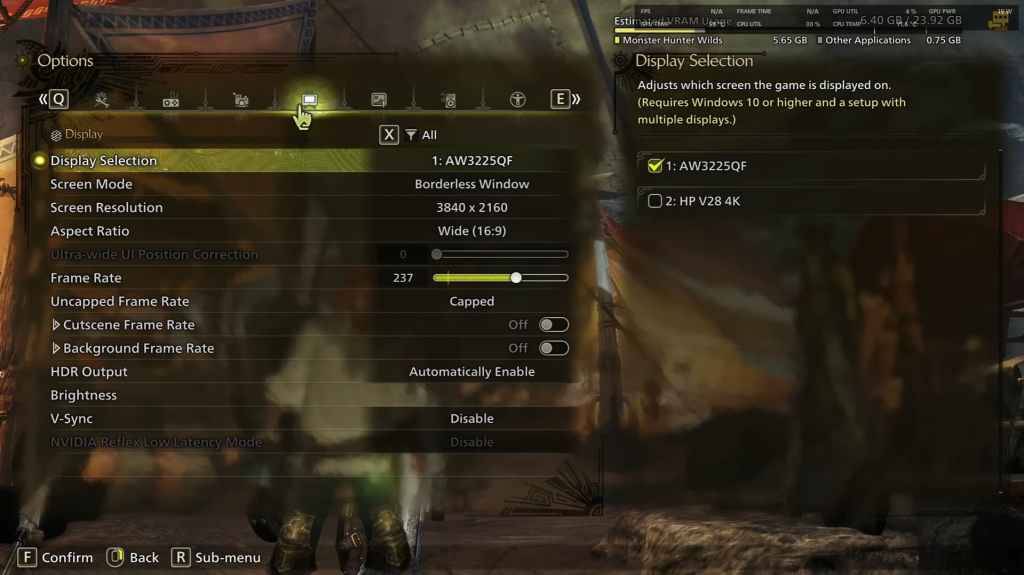
- Screen Mode: Personal Preference, Bordered Fullscreen works better if you tab out frequently.
- Resolution: Monitor's Native Resolution
- Frame Rate: Match your Monitor's Refresh Rate (e.g., 144, 240, etc.)
- V-Sync: Off for lower input lag.
Graphics Settings
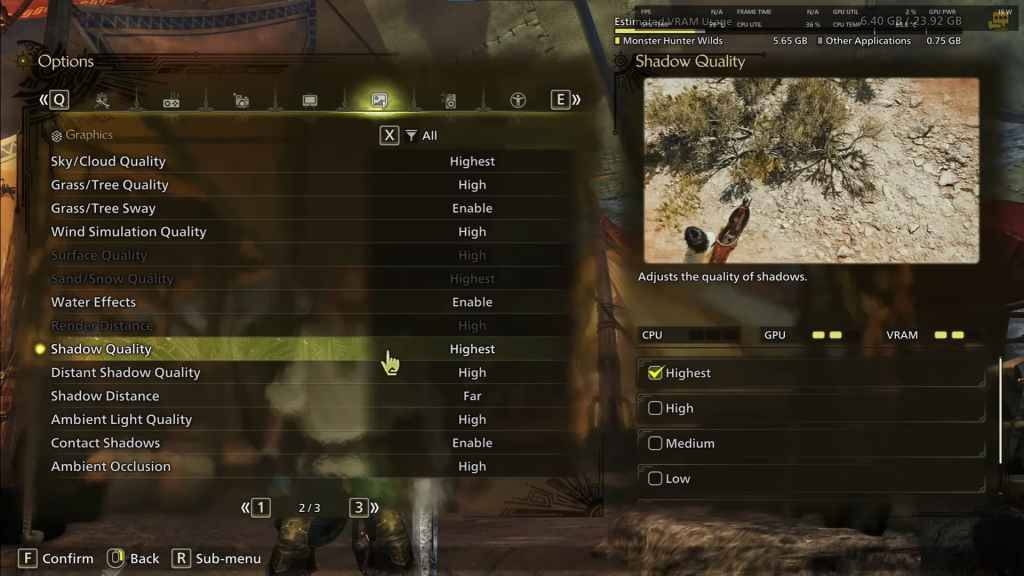
| Setting | Recommended | Description |
| Sky/Cloud Quality | Highest | Enhances atmospheric detail |
| Grass/Tree Quality | High | Affects vegetation detail |
| Grass/Tree Sway | Enabled | Adds realism but has a minor performance impact |
| Wind Simulation Quality | High | Improves environmental effects |
| Surface Quality | High | Details on the ground and objects |
| Sand/Snow Quality | Highest | For detailed terrain textures |
| Water Effects | Enabled | Adds reflections and realism |
| Render Distance | High | Determines how far objects are rendered |
| Shadow Quality | Highest | Improves lighting but is demanding |
| Distant Shadow Quality | High | Enhances shadow detail at a distance |
| Shadow Distance | Far | Controls how far shadows extend |
| Ambient Light Quality | High | Enhances shadow detail at a distance |
| Contact Shadows | Enabled | Enhances small object shadowing |
| Ambient Occlusion | High | Improves depth in shadows |
These settings prioritize visual fidelity over raw FPS, as *Monster Hunter Wilds* is not a competitive game. However, every PC build is unique, so feel free to adjust if you're still experiencing low frame rates. Start by reducing Shadows and Ambient Occlusion, as they are the most resource-intensive. Additionally, lowering distant shadows and shadow distance can significantly boost FPS. You can also reduce Water Effects and Sand/Snow Quality to manage VRAM usage.
Best Settings for Different Builds
Not everyone has a high-end build capable of running games at 4K. Here are the best settings tailored to different tiers of PC builds:
Mid-Range Build (GTX 1660 Super / RX 5600 XT)
- Resolution: 1080p
- Upscaling: AMD FSR 3.1 Balanced
- Frame Gen: Off
- Textures: Low
- Render Distance: Medium
- Shadow Quality: Medium
- Distant Shadow Quality: Low
- Grass/Tree Quality: Medium
- Wind Simulation: Low
- Ambient Occlusion: Medium
- Motion Blur: Off
- V-Sync: Off
- Expected Performance: ~40-50 FPS at 1080p
Recommended Build (RTX 2070 Super / RX 6700XT)
- Resolution: 1080p
- Upscaling: FSR 3.1 Balanced
- Frame Gen: Enabled
- Textures: Medium
- Render Distance: Medium
- Shadow Quality: High
- Distant Shadow Quality: Low
- Grass/Tree Quality: High
- Wind Simulation: High
- Ambient Occlusion: Medium
- Motion Blur: Off
- V-Sync: Off
- Expected Performance: ~60 FPS at 1080p
High-End Build (RTX 4080 / RX 7900 XTX)
- Resolution: 4K
- Upscaling: DLSS 3.7 Performance (NVIDIA) / FSR 3.1 (AMD)
- Frame Gen: Enabled
- Textures: High
- Render Distance: Highest
- Shadow Quality: High
- Distant Shadow Quality: High
- Grass/Tree Quality: High
- Wind Simulation: High
- Ambient Occlusion: High
- Motion Blur: Off
- V-Sync: Off
- Expected Performance: ~90-120 FPS at 4K (upscaled)
*Monster Hunter Wilds* offers a plethora of graphical options, but not all impact gameplay equally. If you're struggling with performance, reducing shadows, ambient occlusion, and render distance can help. Budget users should leverage FSR 3 upscaling to boost FPS, while high-end builds can handle 4K settings with frame generation.
For the best balance, use a mix of medium to high settings, enable upscaling, and adjust shadows and distance settings according to your hardware.
And those are the best graphics settings for *Monster Hunter Wilds*.
*Monster Hunter Wilds is available now on PlayStation, Xbox, and PC.*






















![City Devil: Restart [v0.2]](https://img.icssh.com/uploads/38/1719554737667e52b102f12.jpg)


