
Quick Links
Loot filters are essential tools in Path of Exile 2, especially when items start dropping in large quantities. They help reduce screen clutter and highlight the most valuable items, making your looting experience smoother and more efficient. While manually sorting and picking up items on consoles or with a controller can be tedious, PlayStation and Xbox players can also benefit from item filters, just like their PC counterparts. Here's a straightforward guide to help you set up and use loot filters on consoles.
How to Link Path of Exile 2 and Console Accounts
To use loot filters on the console versions of Path of Exile 2, you must first link your console accounts to your Path of Exile account. This process is facilitated through the Path of Exile 1 website. Follow these steps to link your accounts:
- Log in to the Path of Exile website.
- Click on your account name located in the upper-left corner of the webpage.
- Select "Manage Account" on the right side, below your profile name and avatar.
- Under the "Secondary Login" section, click the Connect button for either Sony (PS) or Microsoft (Xbox).
After clicking the Connect button for your chosen console, you will be prompted to log in with your existing PlayStation or Xbox account. Follow the on-screen instructions to complete the linking process.
Finding and Using Loot Filters
Once your accounts are successfully linked, return to your profile page on the Path of Exile website and click on the "Item Filters" button on the right side. Then, click on the "Item Filter Ladder" hyperlink to open a new tab in your browser, which will display the best loot filters available for Path of Exile 2.
At the top of the filter list, you'll find a drop-down box. Change this to "PoE 2." Next, select the filter you wish to use and click the "Follow" button on the filter's page. For new players, we recommend starting with NeverSink's semi-strict or regular filters for a more streamlined experience.
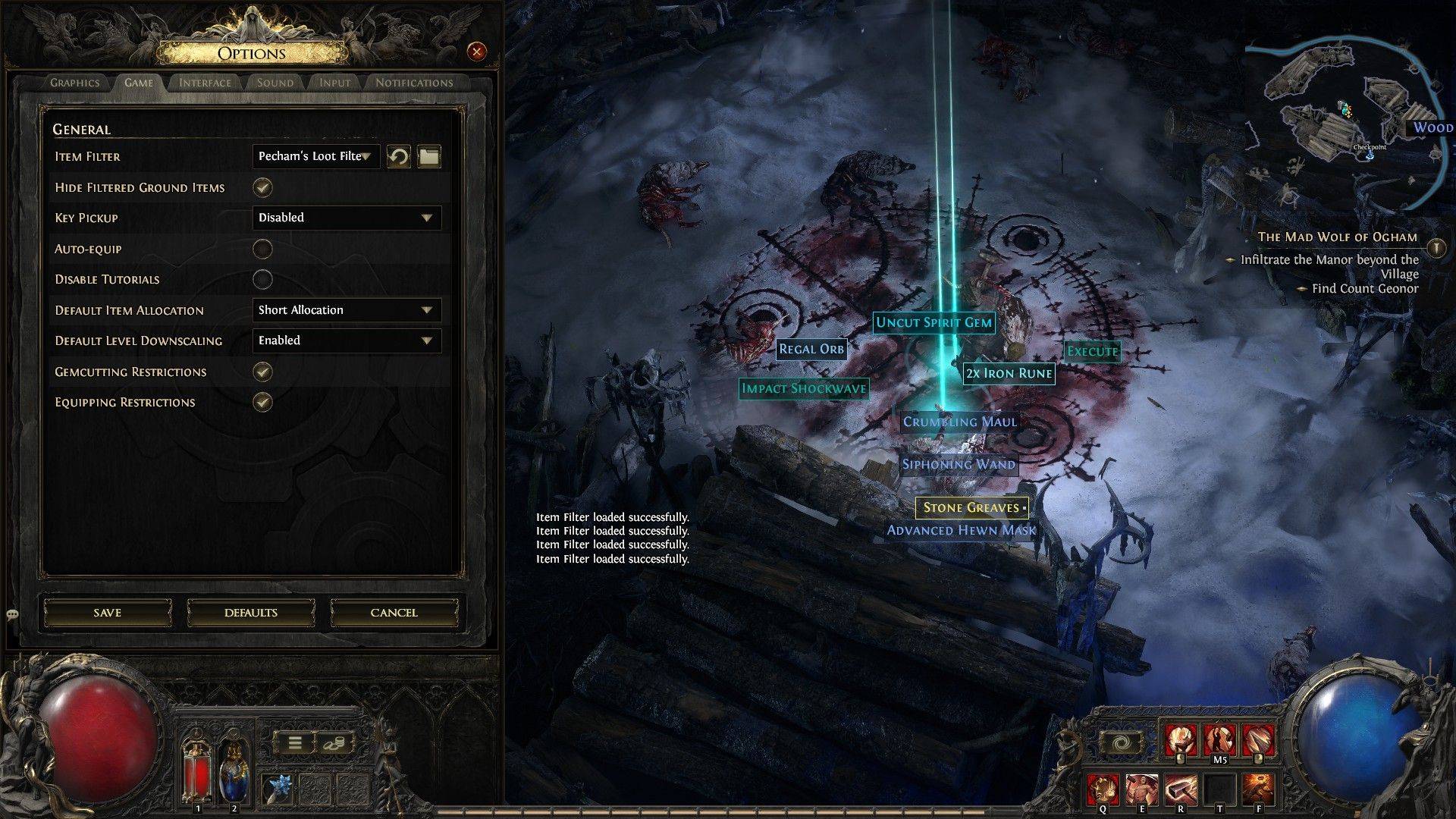
After following a loot filter on the official website, launch Path of Exile 2 and navigate to the Options menu. Go to the Game tab, where you'll find the Item Filter option at the top. The filter you followed should appear in the drop-down menu. Select it and click Save. From this point forward, items that drop in the game will be labeled, colored, or accompanied by sound effects according to the filter you've enabled.























![City Devil: Restart [v0.2]](https://img.icssh.com/uploads/38/1719554737667e52b102f12.jpg)


